
Advanced mode
Start with Simple mode
The provider table shows every available source, required credentials, supported data, current allowance, and connection action.
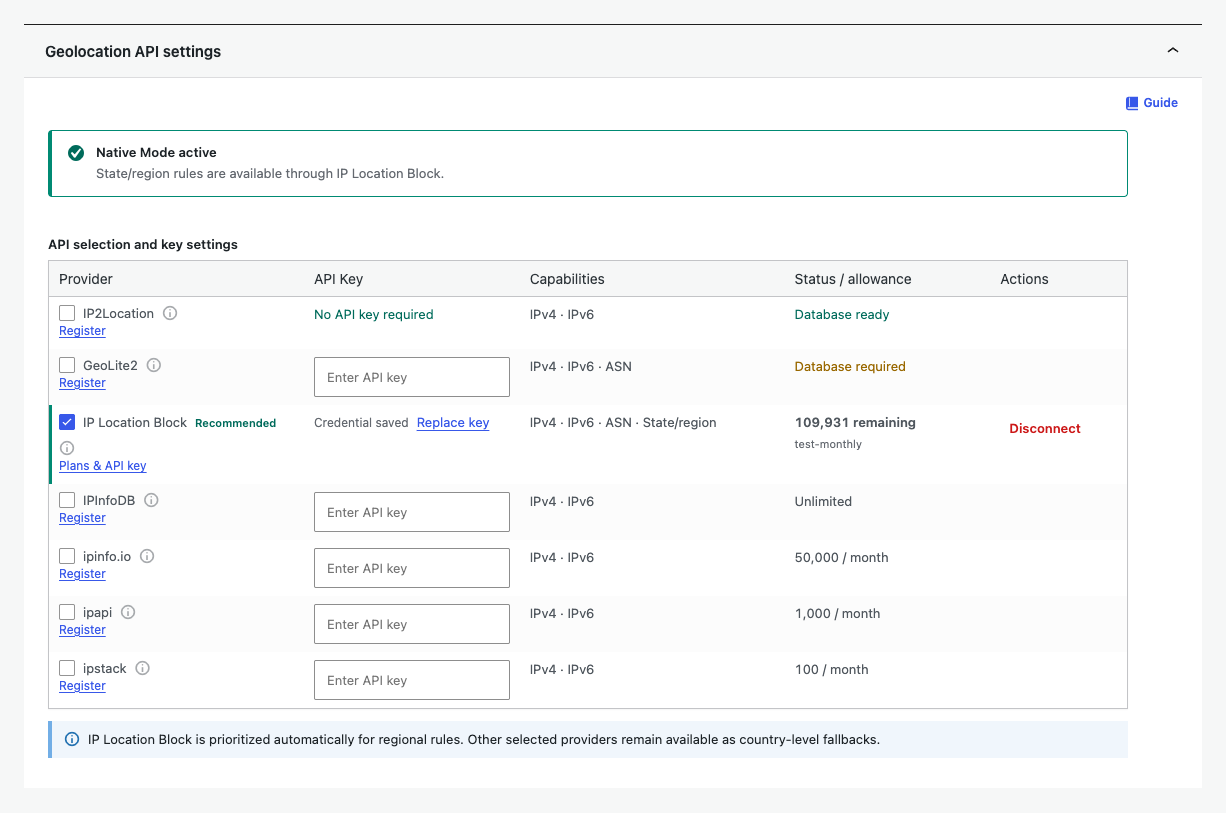
Connect or change a provider
- Select a provider.
- Enter the API key when required.
- Use the test and connect action.
- Review the status or allowance before relying on the provider.
Testing, connecting, replacing a key, and disconnecting are immediate. They do not require another Save Changes click.
Capabilities and priority
Country rules work with every provider. IP Location Block is prioritized automatically when a state or region rule needs precision. Other selected providers remain available for country-level fallback.
| Control | Use |
|---|---|
| Provider selection | Enables the sources available to the resolver. |
| API key | Stores or replaces the credential required by an API provider. |
| Capabilities | Shows IPv4, IPv6, ASN, and state or region support. |
| Status or allowance | Shows local database readiness, remote quota, or connection status. |
| Disconnect | Removes the selected provider connection without deleting the location rule. |
| Network timeout | Limits remote lookup time when host debug controls are enabled. |
Switching providers never turns off location blocking. Unsupported precision controls become unavailable with a warning, while country matching continues.
For task-focused provider management, see Manage or disconnect a provider.