
Advanced mode
Start with Simple mode
Local database providers read geolocation files from your server. They avoid a remote API request but require current files and a working scheduled update.
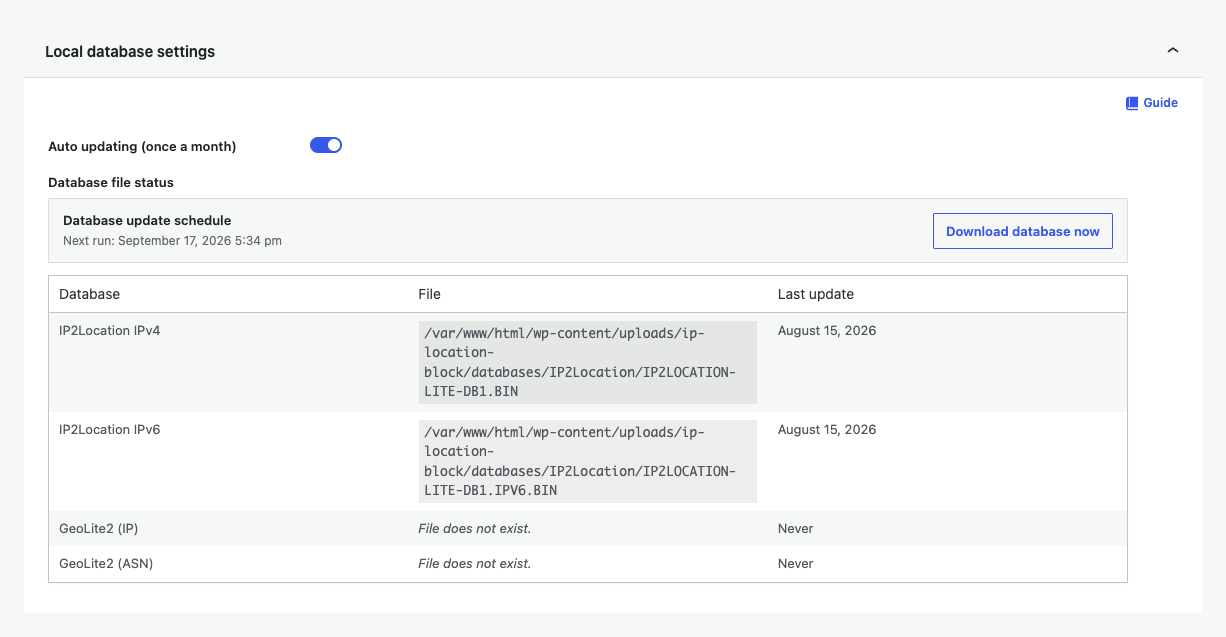
Install and maintain files
- Turn on monthly automatic updates.
- Use Download database now for the first install or an immediate refresh.
- Confirm every required IPv4 and IPv6 row has a path and recent update.
- Run Diagnostics after a failed download.
| Control | Use |
|---|---|
| Auto updating | Schedules a database refresh once a month. |
| Download database now | Starts an immediate download and refreshes file status. |
| Database file status | Shows provider, IP version, path, and update state. |
The bundled local databases are intended for country matching. Use a provider that returns state or region data when a precise administrative-area rule is required.
See the shared Local geolocation databases guide for file permissions and provider switching.