
WP Engine uses server-level page caching (Varnish) that serves cached HTML to visitors before PHP ever executes. This means that when IP Location Block’s Front-end target settings validation is enabled, the first visitor’s response may be cached and served to all subsequent visitors — regardless of their location. Geolocation checks are bypassed entirely for cached pages.
This affects two WP Engine cache layers:
- Page cache — Varnish stores the dynamically generated page and serves it for up to 10 minutes.
- Edge Full Page Cache — Stores the entire HTML output on Cloudflare’s CDN edge nodes globally.
How to fix this
To ensure IP Location Block can validate every visitor, you need to exclude the protected pages from WP Engine’s page cache.
Option 1: Add cache exclusions (recommended)
Contact WP Engine support and request a page cache exclusion for the paths where you need geolocation blocking. For example, if you are blocking visitors on all public pages, request an exclusion for /* or for specific page paths.
WP Engine support can add exclusions based on:
- Paths — URL patterns (e.g.,
/membership/,/restricted-content/) - Cookies — Specific cookie names that trigger a cache bypass
- Query arguments — Query string parameters
Option 2: Disable Edge Full Page Cache
If you have Edge Full Page Cache enabled, you may need to disable it for pages that require geolocation validation:
- Log in to the WP Engine User Portal
- Navigate to Manage > Cache in the left sidebar
- Under Edge Full Page Cache, toggle it Off
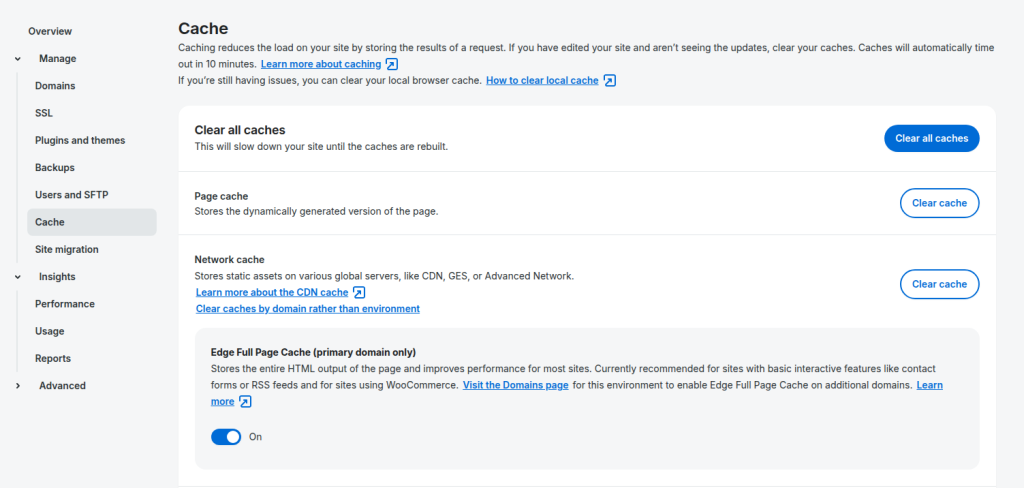
Note that this only disables the CDN-level HTML cache. The server-level Page cache (Varnish) will still be active and requires cache exclusions from Option 1.
Option 3: Clear caches after configuration changes
After enabling or changing Front-end target settings in IP Location Block, always clear WP Engine’s caches:
- In the WP Engine User Portal, go to Manage > Cache
- Click Clear all caches
This ensures stale cached pages that were served before geolocation validation was enabled are purged. However, new pages will still be cached — this option alone is not sufficient without exclusions from Option 1.
Summary
| Cache Layer | Affects Plugin? | Solution |
|---|---|---|
| Page cache (Varnish) | Yes | Request path exclusions from WP Engine support |
| Network cache (CDN) | No (static assets only) | No action needed |
| Edge Full Page Cache | Yes | Disable or request exclusions |
For most sites, requesting cache exclusions for specific paths (Option 1) provides the best balance between performance and geolocation enforcement.